Posts

Generating Random data in Excel

Sometimes we are required to use a list of names constructed from some chars followed by random numbers In order to use the parameter type FILE in LR parameter list with names constructed from chars followed by random numbers you might be require to develop a function to create names dynamically. Use the excel functions below to generate a random chars strings followed by random number generated between a given range, one for uppercase chars and the other for lowercase chars, as shown below. The prefix can be changed according to your needs, with simple adjustments. It’s a simple but effective way to create a list of names to suite our needs. Functions : Starting Letter Capital F followed by 6 small Letters =TEXT(RANDBETWEEN(97,122),)&CHAR(RANDBETWEEN(70,70))&CHAR(RANDBETWEEN(97,122))&CHAR(RANDBETWEEN(97,122))&CHAR(RANDBETWEEN(97,122))&CHAR(RANDBETWEEN(97,122))&CHAR(RANDBETWEEN(97,122))&CHAR(RANDBETWEEN(97,122)) Output:-...

JMeter Learning

Image
My Learning with JMeter. This new year, i will come with some post on my learning with JMeter. This is the first inital post, which is starting point. Apache JMeter Apache JMeter   is Open Source Software, a 100% pure Java desktop application designed to load test client/server software (such as a  web application  ).  It may be used to test performance both on static and dynamic resources such as static files, Java Servlets, Perl scripts, CGI scripts, Java objects,  databases and queries  ,  FTP servers  , and more. JMeter can be used to simulate a heavy load on a server, network or object to test its strength or to analyze overall performance under different load types. JMeter can help you regression test your application by letting you create test scripts with assertions to validate that your application is returning the results you expect. For maximum flexibility, JMeter lets you create these assertions using regu...

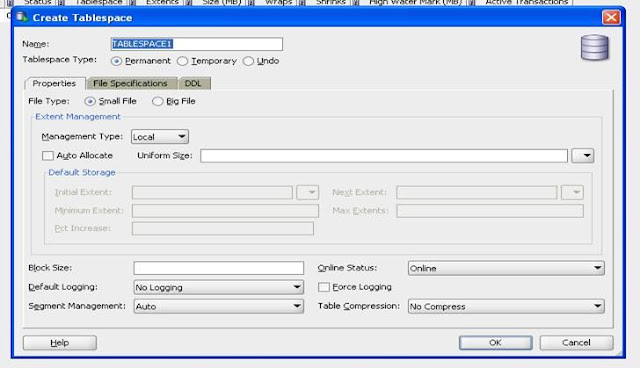
Using SQL Developer to create and view Tablespaces

Image
Below are the steps Create and View Table Spaces settings using SQL Developer. Required SQL developer version is version 3.0 To Create TableSpace : Click on Menu View/DBA - DBA navigator window will appear. In the DBA window add a new connection to the DB, and click connect. Then under storage option right click on Tablespaces and choose New Tablespace to create new one. Fill the Details as shown below: To View the created table spaces: Under Storage, Select Data Files: It will display the below:

Enabling GC Activity Logging Without Restarting the JVM

Enabling Garbage Collection (GC) activity logging normally requires a restart of the JVM hosting the service. Below steps explains how GC logging can be enabled without requiring a JVM restart for a chosen service. Assuming  user1  is the  owner  of the running JVM process, and  10274  is the  PID  (Process ID) of the JVM you are targeting, you can get the GC logging info from it by using: sudo -u user1 /usr/java/default/bin/jinfo -flag +PrintGC 10274 sudo -u user1 /usr/java/default/bin/jinfo -flag +PrintGCTimeStamps 10274 sudo -u user1 /usr/java/default/bin/jinfo -flag +PrintGCDetails 10274 Note: The output is stdout

Shell Script to add SSH automatic Login

Script to add SSH automatic Login #!/usr/bin/ksh -f RUSER=$1 RHOST=$2         if [ -z "${RHOST}" ]         then                 echo "\nUsage: $0 remoteUserName remoteHostName\n"                 exit 22         fi         if [ ! -f ${HOME}/.ssh/id_rsa.pub ]         then                 echo "SSH not configured for user ${LOGNAME} - creating key..."                 ssh-keygen -trsa -N "" -f ~/.ssh/id_rsa                 STATUS=$?                 if [[ ${STATUS} -ne 0 ]]                 then                         echo "SSH configurat...

Shell Script to kill all java processes on different hosts

Shell Script to kill all java processes on different hosts. The scripts assumes auto login using shh is enabled. The steps are explained here #!/bin/bash #################################### # Set These Values to correspond to your environment #################################### BLHOSTS=(linhtr1 linhtr2 linhtr3 linhtr4); SH_CMD=ssh #################################### SCRIPT_HOME=`dirname $0` for host in ${BLHOSTS[@]}; do      echo $SH_CMD $host "ps -ef | grep java|cut -b10-15|xargs kill -9"      $SH_CMD $host "ps -ef | grep java|cut -b10-15|xargs kill -9" done

Unable to create new native threads resolution

In one of our new machines, we are trying to start our servers. For 4 Servers, the system was working properly, but with 8 Servers it was throwing below exception. [gsc][3/20922] Caused by: java.lang.OutOfMemoryError: unable to create new native thread 2012-09-19 20:06:24,217 GSA WARNING [com.gigaspaces.grid.gsa] - [gsc][3/20922]: Reported Error [Restart Regex [.*java.lang.OutOfMemoryError.*] matching [Caused by: java.lang.OutOfMemoryError: unable to create new native thread]], restarting [gsc][1/] /<path>//bin/gs.sh: line 92: 21421 Aborted (core dumped) "$JAVACMD" ${JAVA_OPTIONS} -DagentId=${AGENT_ID} -DgsaServiceID=${GSA_SERVICE_ID} $bootclasspath $script_classpath ${RMI_OPTIONS} $libpath ${LOOKUP_GROUPS_PROP} ${LOOKUP_LOCATORS_PROP} -Dcom.gs.logging.debug=false ${GS_LOGGING_CONFIG_FILE_PROP} $NETWORK $DEBUG $launchTarget $command_line # # There is insufficient memory for the Java Runtime Environment to continue. # Cannot create GC thread. Out of system reso...