Posts

Tool : PerfAnalyzer

Image
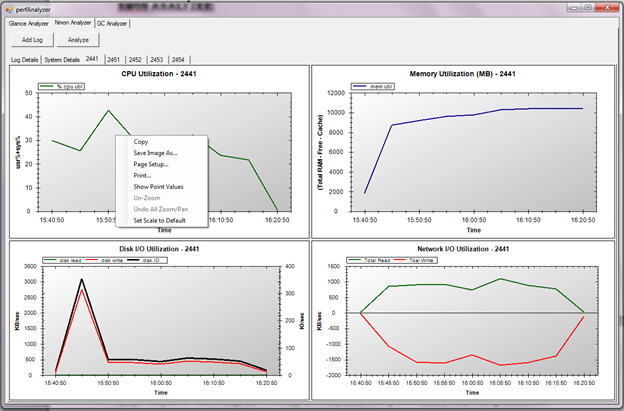
Tool : PerfAnalyzer This tool developed internally for analyzing the output of Glance, nmon and GC Logs. The tool has three tabs: 1.        Glance Analyzer 2.        Nmon Analyzer 3.        GC Analyzer Glance Analyzer: This is used to analyze the output of Glance command. It is sub-divided into two tabs: 1.        Off-line Mode :  To analyze the saved Glance output 2.        Online Mode : To analyze the Glance Logs online while the test is running. (Enhancements in Progress) Inputs required: Glance output file. Output obtained : Graph outputs of CPU Utilization, Memory Utilization, Disk Utilization and Swap Utilization. Also gives Min, Max and Avg values for CPU, Memory and Disk Usage. Nmon Analyzer: This is used to analyze the output of nmon command. Inputs required: nmon output f...
Finding memory problems

Finding memory problems: When performance testing a java application and want to identify memory problems, below steps will help: 1.    Don’t call it “memory leak” until you are 100% sure-make your program manager jump up and down. (A better term “unaccountable heap usage”, etc.) 2.    There is probably some “unaccountable heap size” from each release, there is no need and no time to look for small ones. Concentrate on the large ones which could cause problem down the road. 3.    There are some caches which is not leakage-watch out for their growth in size. Also check for some session data, which might be cleaned up after user logoff. 4.    Run 72-90 hour stability test under load for each release, monitoring java heap size. Check java heap GC frequency and old gen size. (cat “Full GC” myServer.log |awk ‘/Full GC/ {getnextline; getnextline;getnextline;print $0}’ | awk ‘{print $4}’) 5.    Enable GC Logging in JA...

Correlation and checking in Results

Image
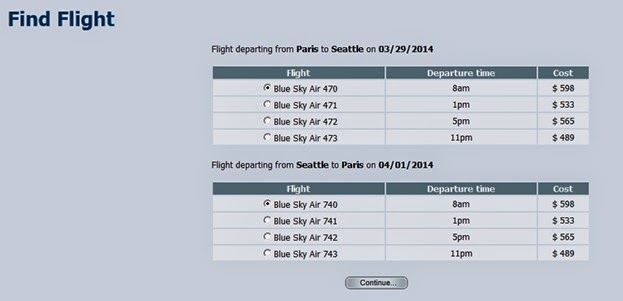
Correlation and checking In Previous post we have randomly selected value for depart and arrive. Each Depart and arrive have a outboundFlight and returnFlight field, which changes according to the selected values. For E.g.: When we recorded the script with depart as “London” and arrive as “Paris” the below flight details was recorded accordingly to the selection.      /*web_submit_form("reservations.pl_2",          "Snapshot=t5.inf",          ITEMDATA,          "Name=outboundFlight", "Value=241;97;03/28/2014", ENDITEM,          "Name=returnFlight", "Value=422;102;03/29/2014", ENDITEM,          "Name=reserveFlights.x", "Value=26", ENDITEM,          "Name=reserveFlights.y", "Val...

How to choose a value randomly from the list

Image
How to choose a value randomly from the list For demonstrating the example, we will use the sample application (HP Web Tours Application).  This application shows a sample where we can book flight tickets. The options in depart and arrive are shown as below: web_submit_data ( "reservations.pl" ,          " Action = http://127.0.0.1:1080/cgi-bin/reservations.pl " ,          " Method = POST " ,          " RecContentType = text/html " ,          " Referer = http://127.0.0.1:1080/cgi-bin/reservations.pl?page = welcome " ,          " Snapshot = t4.inf " ,          " Mode = HTML " ,          ITEMDATA ,          " Name = advanceDiscount " ,  " Value = ...

Examples on Date and Time in LoadRunner

Following are some examples in Datetime Format: Datetime Format Codes The following format codes are supported for lr_save_datetime. Code Description %a day of week, using locale's abbreviated weekday names %A day of week, using locale's full weekday names %b month, using locale's abbreviated month names %B month, using locale's full month names %c date and time as %x %X %d day of month (01-31) %H hour (00-23) %I hour (00-12) %j number of day in year (001-366) %m month number (01-12) %M minute (00-59) %p locale's equivalent of AM or PM, whichever is appropriate %S seconds (00-59) %U week number of year (01-52), Sunday is the first day of the week. Week number 01 is the first week with four or more January days in it. %w day of week...